
You are on lesson 10 of 11 in the course Path 1: Captions.
Module 1.2: Exporting Transcripts for Records Requests
Government agencies face dual obligations: accessibility under ADA Title II and transparency under open records laws. Transcripts serve both. When someone files a FOIA or public records request for meeting documentation, accessible transcripts demonstrate compliance and support transparency.
Why transcripts matter for compliance
ADA Title II requires accessible government programs and services. The DOJ's 2024 final rule requires WCAG 2.1 Level AA compliance, with enforcement beginning April 26, 2027, for jurisdictions with 50,000+ residents. For video, this means synchronized captions (WCAG 1.2.2 for prerecorded, 1.2.4 for live).
Transcripts provide three critical functions: they make video searchable (find specific discussions without watching hours of footage), support accessibility beyond captions (easier for screen readers and self-paced reading), and fulfill public records requirements. When someone requests "all city council discussion regarding the downtown parking ordinance," searchable transcripts let you quickly locate relevant portions.
FOIA and open records implications
State public records laws require agencies to provide government documents upon request. Video recordings and transcripts both qualify as public records.
Transcripts solve practical problems. A two-hour meeting might be a 4GB video file, but only a 50KB transcript—easier for limited server capacity and slow internet connections. Not everyone has bandwidth for large video files or assistive technology to access video content. Providing both formats ensures accessibility and meets the requirement that people with disabilities have equal access to public records.
Understanding transcript formats
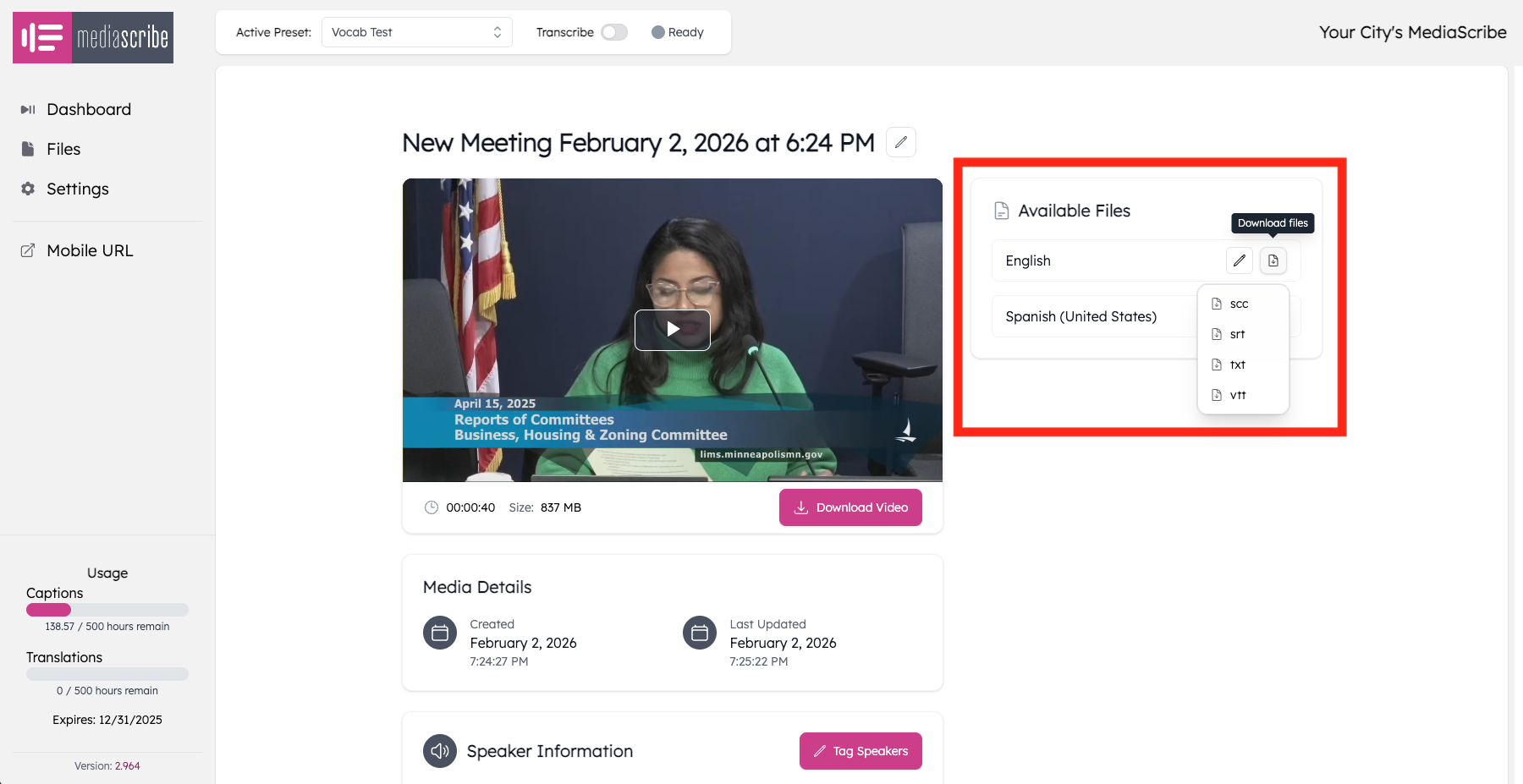
MediaScribe generates transcripts in multiple formats:
SRT (SubRip Text) includes timestamps and spoken text. Most video platforms display SRT files as synchronized captions. Use SRT when captions need to synchronize with video playback.
WebVTT (Web Video Text Tracks) is designed for HTML5 video with additional styling features. If your agency hosts video on your own website, WebVTT is often preferred.
Plain text strips timing information and presents spoken words organized by speaker. Best for independent reading, keyword searches, meeting minutes preparation, and screen reader users.
For records requests, provide multiple formats: plain text for reading, SRT/WebVTT for video viewing.
Exporting transcripts from MediaScribe
MediaScribe automatically generates transcripts after processing a meeting. To export: log into MediaScribe, navigate to Files, locate the meeting, click to view details, and download your needed format (plain text, SRT, or WebVTT). The system downloads files as standard text files. Share via email, post to your website, or store in your records system.
Publishing transcripts on your website
Making transcripts available proactively demonstrates commitment to transparency. Create a consistent location (clerk's page or embedded with video). Use descriptive filenames matching video files: if video is "City_Council_2026-02-04.mp4," name transcript "City_Council_2026-02-04_Transcript.txt."
Include a disclaimer: "This transcript was automatically generated and may contain minor errors. For official minutes, see the clerk's office." Provide multiple formats with clear labels: "Download readable transcript (TXT)" and "Download caption file for video (SRT)."
Records retention best practices
Transcripts are public records requiring retention per your jurisdiction's schedule—typically matching the meeting recording period. Store transcripts in your records management system with agendas, minutes, and recordings. Organize systematically by year, month, and meeting type. MediaScribe automatically organizes files by date and preset configuration.
Back up transcripts with other records (text files add minimal storage). Dispose of transcripts simultaneously with corresponding recordings to maintain consistent retention and avoid selective destruction issues.
MediaScribe integration
MediaScribe simplifies transcript management by automatically generating transcripts during the captioning process. Every meeting you caption produces multiple outputs: live captions, synchronized caption files (SRT, WebVTT), and plain text transcripts—all stored in the Files section.
The export workflow is straightforward: select the meeting, choose your format, and save. For agencies working through backlogs of archived content, MediaScribe's batch processing capability generates captions and transcripts for years of historical meetings, creating a complete searchable archive.
Summary
Key takeaways:
Transcripts serve dual purposes: meeting ADA Title II accessibility requirements and fulfilling FOIA/open records obligations
Three formats serve different needs: SRT and WebVTT for synchronized captions with video, plain text for independent reading and screen reader access
Proactive publication of transcripts on your website demonstrates transparency and reduces records request workload
Transcripts must follow the same retention schedule as corresponding video recordings to maintain consistent records management
MediaScribe automates transcript generation in all formats, with batch processing available for historical archives