
You are on lesson 5 of 5 in the course Path 2: Audio Descriptions.
Module 2.2: AI-Accelerated Audio Description
Audio description transforms video accessibility by narrating visual content for people who are blind or have low vision. For government agencies working toward WCAG 2.1 Level AA requirements, traditional audio description production presents a significant challenge. Professional narrators, weeks of production time, and high costs put accessibility out of reach for many organizations.
AI-powered audio description changes this equation. By automating initial description generation, agencies can process video content in hours instead of weeks. Understanding where AI excels and where human review remains essential helps you build a sustainable accessibility program.
What AI audio description does
AI audio description systems work through six automated steps that transform raw video into accessible content:
Transcription - The system converts spoken dialogue to text, identifying individual speakers and detecting sentence boundaries. This transcript establishes when people are talking and when natural pauses occur.
Gap detection - The AI scans the audio track for silences lasting three seconds or longer. These gaps become placement points for descriptions, ensuring narration never competes with dialogue.
Visual analysis - Computer vision technology identifies meaningful visual elements: speaker movements, on-screen text, graphics, audience reactions, and scene changes. The system filters out decorative elements that don't convey essential information.
Description generation - Using the visual analysis and speech patterns from the transcription, the AI writes descriptions that fit naturally into available gaps.
Text-to-speech synthesis - Professional-grade neural voices convert written descriptions into natural-sounding narration at 2.5 words per second, the industry standard for comfortable listening.
Overlap resolution - If a description runs too long for its gap, the system automatically summarizes the content while preserving essential information.
The entire process runs automatically in the background. You upload a video, name your project, and wait while the system processes everything from transcription through final rendering. You'll receive an email when processing is complete, and your project is ready for review.
Where AI excels
AI-powered systems handle several audio description tasks exceptionally well:
Identifying visual content - Computer vision reliably detects text, graphics, speaker changes, and scene transitions. When your city council displays presentation slides, shows budget pie charts, or switches between cameras during public testimony, the AI recognizes these visual elements automatically.
Maintaining consistent pacing - The AI adheres to standard narration speeds automatically, maintaining professional-quality pacing throughout your video. Whether you're describing a brief committee update or a four-hour planning commission meeting, the narration stays consistent.
Scaling across large content libraries - Traditional description production for a single hour-long video might take a full workweek. AI-generated descriptions for the same content process in a few hours. If your city archives every council meeting, planning hearing, and public workshop, AI makes describing this volume of content feasible.
Handling straightforward visual elements - When visual content is clear and unambiguous—a speaker standing at a podium, a pie chart with labeled sections, text appearing on screen—AI descriptions are often accurate and appropriate. Most routine meeting visuals fall into this category.
Creating draft descriptions faster than any manual process - Even when descriptions need refinement, starting from AI-generated drafts dramatically reduces production time compared to writing every description from scratch.
Where human review remains essential
AI systems have real limitations that require human oversight:
Context and nuance - AI may miss subtle but important visual cues. A council member's facial expression during a contentious vote, the significance of a particular budget chart in the context of ongoing policy debates, or body language that conveys skepticism during public testimony all require human judgment to describe appropriately.
Cultural sensitivity - Describing visual elements involving diverse communities, potentially sensitive topics, or local cultural contexts demands human awareness. When a city council meeting includes community members from different cultural backgrounds, or when public hearings address sensitive neighborhood issues, AI lacks the cultural competence to navigate these situations consistently.
Technical accuracy in specialized contexts - Legal proceedings, technical presentations, or content requiring specialized vocabulary benefit from review by someone familiar with the subject matter. When your planning commission discusses zoning variances or your public works department presents infrastructure engineering plans, AI might describe what it sees but misunderstand what matters to your audience.
Tone and appropriateness - Matching description style to audience expectations and organizational voice requires human judgment. What sounds neutral to an algorithm might feel inappropriate to your community. A memorial service livestream needs a different tone than a budget workshop.
Quality consistency - AI performance varies based on video quality, audio clarity, and visual complexity. Some descriptions will be excellent, others adequate, and some will miss the mark entirely. Human reviewers identify which descriptions need refinement.
Critical events - Emergency information, safety instructions, or urgent visual warnings must be described accurately and immediately. When your emergency management office presents evacuation procedures or your public health department demonstrates safety equipment, critical situations require human verification.
The goal isn't AI-generated descriptions that perfectly match what a professional narrator would create. The goal is AI-generated descriptions that provide a solid foundation for human refinement, dramatically reducing the time and cost of producing quality audio description.
MediaScribe Narrate: AI audio description workflow
MediaScribe Narrate integrates AI-powered audio description into a complete cloud-based platform designed for government accessibility workflows.
Step 1: Upload and configure
Upload your video file directly to MediaScribe Narrate. The system accepts MP4 and MOV files up to 10GB. Drag and drop your file or enter a video URL if your content is already hosted online.
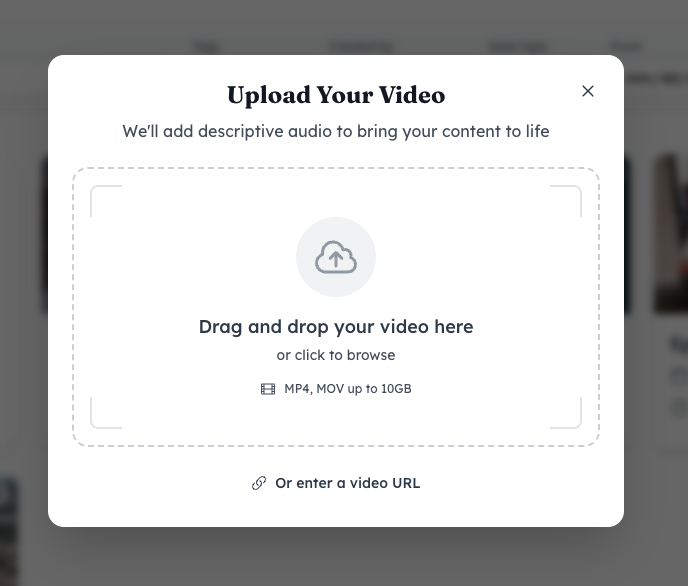
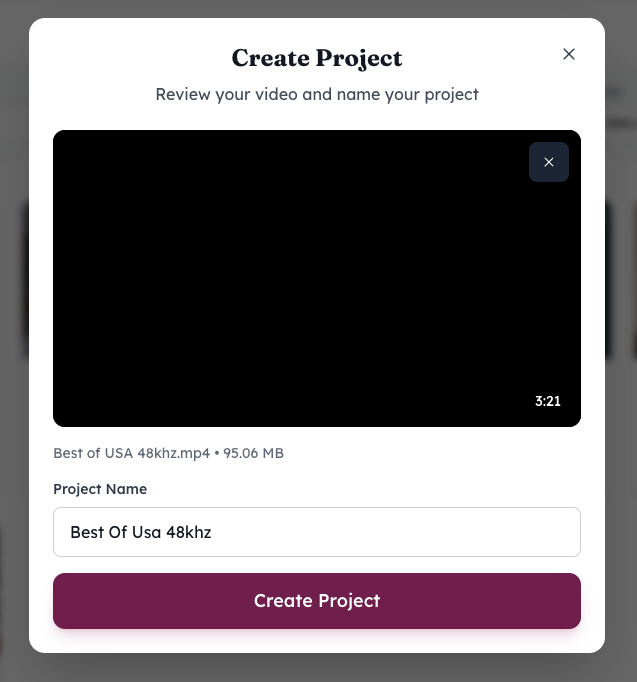
After uploading, you'll name your project, and the system begins processing. You can navigate away and continue other work—MediaScribe Narrate sends an email notification when your video has been processed and is ready for review.
Step 2: Automated processing
MediaScribe Narrate's automated pipeline handles the entire workflow without manual intervention. The system processes your media, creates transcripts, maps dialogue gaps, identifies visual elements, generates descriptions, converts them to narration, detects timing issues, and produces your accessible video.
Processing time varies based on video length but typically completes in a few hours. For a typical one-hour city council meeting, expect processing to complete in two to three hours.
Step 3: Review and refinement
This is where human expertise becomes essential. MediaScribe Narrate provides an interactive timeline editor that makes quality assurance efficient.
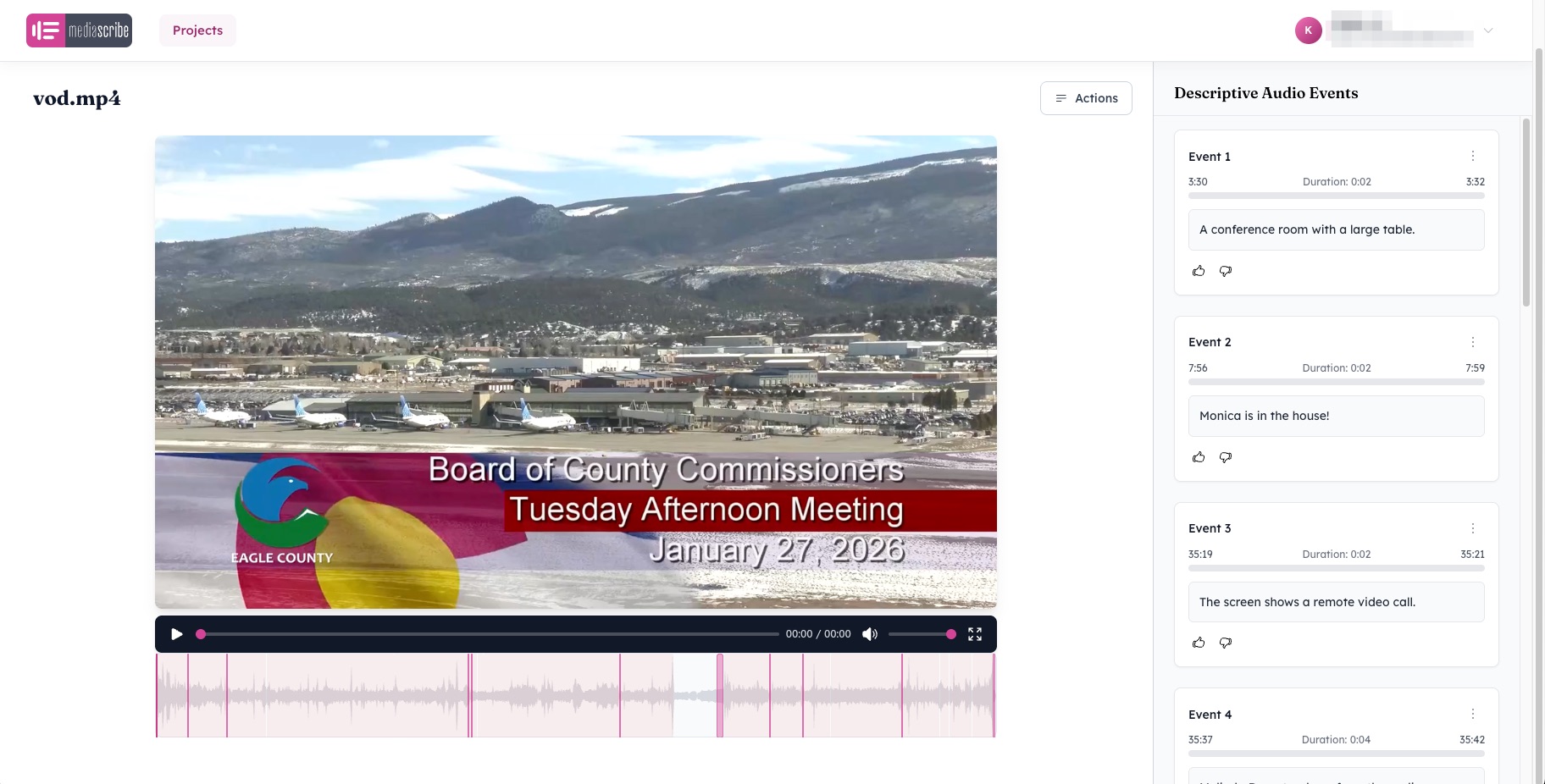
The interface displays your video with a waveform timeline below it. On the right side, a "Descriptive Audio Events" panel lists each AI-generated description with its start time, duration, and end time.
Click any event in the list to jump to that moment in your video. Play the segment to see the visual content being described and hear how the generated narration sounds in context. This immediate feedback makes it easy to assess whether descriptions are accurate and appropriate.
Edit description text by clicking on the event. Common edits include adding speaker names when the AI says "a council member speaks," correcting technical terminology, or adjusting tone for sensitive content.
Use the thumbs up and thumbs down buttons to provide feedback on individual descriptions. This helps you track which descriptions work well and which need attention during your review process.
The timeline view makes it easy to see where descriptions fall in relation to dialogue. Pink markers on the waveform indicate where descriptions have been placed, helping you verify that timing works naturally with your video's audio.
AI-generated descriptions provide a strong starting point, but accuracy and appropriateness must be reviewed by trained staff. Your review team should verify that descriptions accurately convey visual information, use appropriate tone for your audience, and align with your organization's accessibility standards.
Step 4: Export and distribution
Once you've reviewed and refined descriptions, MediaScribe Narrate renders your final accessible video. You can export video files with audio descriptions mixed into the main audio track, separate audio description tracks for flexible playback, or compliance-ready formats for web publishing and broadcast.
The system maintains both original and edited descriptions for quality assurance documentation, supporting compliance audits and ongoing reference.
Practical considerations for implementation
Start with archival content - Your first AI audio description projects should be completed meetings or events, not live content. Choose a routine city council meeting from last month or a recorded public workshop. This gives your team experience with the review workflow before handling time-sensitive material. You'll learn how the AI handles your specific meeting format, video quality, and typical visual content.
Establish quality standards - Define what "good enough" means for your organization. Create sample descriptions that represent your quality threshold. Does the description need to identify every council member by name, or is "a council member" acceptable in routine situations? Document these decisions so your review team stays consistent.
Train your review team - Reviewing AI-generated descriptions requires different skills than writing descriptions from scratch. Your clerk's office staff, communications team, or media center employees need to recognize problematic descriptions quickly and understand what makes a good description in your specific context. Budget time for initial training—perhaps two hours for basic orientation plus several practice review sessions.
Budget time for review - While AI dramatically reduces production time, plan for human review as part of your workflow. A one-hour city council meeting might require 30-90 minutes of review time depending on how many visual elements were presented and how complex the content was.
Document your process - Create written guidelines for your review team covering tone expectations, how to handle specific content types, and when to escalate questions. If you serve a culturally diverse community, include guidance on culturally appropriate descriptions. If certain departments regularly present technical content, note which staff members have subject matter expertise to consult.
Collect feedback from community members - The people who rely on audio descriptions are your ultimate judges of quality. Include a feedback mechanism on your video archive page or accessibility contact information. Some jurisdictions create accessibility advisory committees that include community members with disabilities. Use that input to refine your review standards over time.
Cost and resource implications
AI-powered audio description changes accessibility economics dramatically.
Traditional professional audio description typically costs $3,000-5,000 per hour of finished video. Production timelines stretch to weeks for complex content. These costs put comprehensive accessibility out of reach for most government agencies.
AI-accelerated audio description costs a fraction of traditional production. While exact pricing varies by provider, cloud-based AI processing typically runs hundreds of dollars per hour of video rather than thousands. More importantly, processing time drops from weeks to hours, and a single staff member can manage dozens of projects simultaneously.
The tradeoff is that you're investing staff time in review rather than paying for professional description services. But for government agencies already employing media staff, this internal review capacity often exists within your current workforce. You're redirecting existing resources toward accessibility rather than creating entirely new budget requirements.
The human-in-the-loop approach
The most successful AI audio description programs treat AI as a powerful assistant rather than a complete replacement for human judgment. This "human-in-the-loop" approach combines efficiency with quality.
AI handles the time-consuming work: analyzing video content, detecting appropriate placement points, writing initial descriptions, and synthesizing narration. This automation eliminates the most labor-intensive parts of traditional description production.
Humans handle the judgment calls: verifying accuracy, adjusting for context, maintaining appropriate tone, and ensuring descriptions truly serve your community's needs. This oversight ensures quality while keeping workload manageable.
The result is accessible content that supports your accessibility goals while respecting both your community's needs and your organization's resource constraints. You're not choosing between quality and affordability—you're using AI to make quality affordable.
Moving forward with AI audio description
WCAG 2.1 Success Criterion 1.2.5 requires audio description for prerecorded video content when visual information is essential to understanding. This requirement has historically been the most challenging accessibility standard for government agencies to meet.
AI-accelerated audio description makes this requirement more achievable. The technology isn't perfect, but it doesn't need to be. It needs to be good enough to provide people who are blind or have low vision with meaningful access to visual content, verified through human review to maintain quality.
If you're working toward the April 2027 deadline without a clear path to providing audio description for your video content, AI-powered systems like MediaScribe Narrate offer a practical solution. You're not abandoning professional standards—you're using modern technology to meet professional standards within realistic budget constraints.
The 7 million Americans with visual impairments deserve access to government video content. AI-accelerated audio description helps you work toward providing that access.
Need help getting started? Contact the MediaScribe Sales team to discuss MediaScribe Narrate implementation for your organization.